Today we are share with our friends most popular tutorial. Today we share a complete guide on How to Earn Money with YouTube.
YouTube is a huge website where you can watch, share, upload videos. Some people use YouTube just for watching latest videos and some people use it to upload videos and so on!
How to earn money with YouTube? This is the topic, subject that everybody wants to learn! Hundreds of YouTubers made millions of dollars from YouTube.
Yes, it true! If you want to learn how to earn Money with YouTube properly and legally, you’re at the right place to learn! I am gonna share everything that matters in YouTube earning!
I am sure after reading this guide you will be able to fill your pocket with money via YouTube  ! Focus on the screen and start learning!
Earn Money with YouTube
You can earn Money with YouTube only via Google Adsense. Now, the question arises, what is Google AdSense? Simply, Google Adsense is a program by Google that shows ads on YouTube videos. Google Adsense also works for blogs, websites, and other online content’s, but it’s irrelevant to us. We will learn How to earn Money with YouTube via Google Adsense ads just.
Create a YouTube Channel
Remember, you need a Gmail or Google account to create YouTube channel. Create a Gmail account or if you have already an account, simply log into it! Create a YouTube channel. I have collected some tips for you! Please try them:
Choose a good Channel Name
Be creative, don’t copy other’s ideas! Choose a great name for your channel. There is no tool that can suggest you a good channel name except your brain. Use your creative mind that God bestowed you!
Create a good DP + Channel Art
Are you a designer? If yes, design a DP for you YouTube channel. Also create a cool and good looking YouTube channel cover which is called Channel Art. Think it important, please!
Choose your Topic/Niche
In which niche, you’re interested? You can create a channel on any topic. Like if you know about blogging, you can start a channel about Blogging tutorials/tips. In the same, If you know about health tips. you can start a channel about Health tips, and so on! I have seen some Photoshop experts that are earning great by just Photoshop tutorials (which they upload on YouTube).
After you completed the whole process, now we are going to learn the main topic how to Approve AdSense on YouTube channel and earn money.
Approve AdSense and start Earning!
Approving AdSense is fast for YouTube. The amazing thing is that we can approve AdSense via YouTube without uploading a video.
- Simply, go to your Channel. (Log into your account and proceed to channel from which you want to Earn Money with Adsense.
- Then, go to status and features or follow the link.

- Here, you’ll see Monetization option. Enable it!
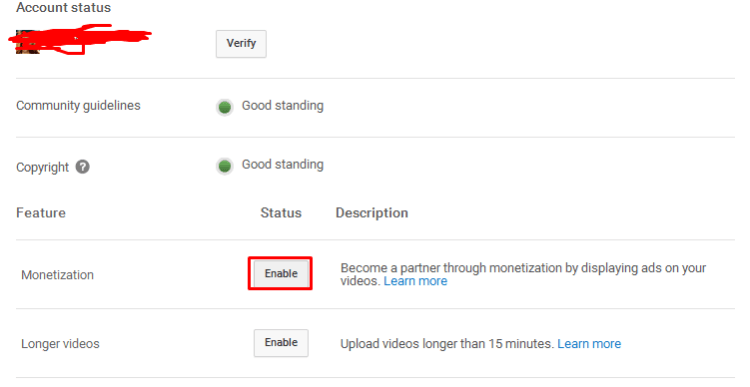
- Now, a window will appear. Click on ‘Enable my Account’.

- As you click on ‘Enable my Account‘, a popup will appear regarding policies and terms. Tick them all and then proceed to ‘I accept‘.
- After that, another popup will appear, just click on ‘Got it‘.
Now, you have submitted the request/application for YouTube Adsense approval. After 30-40 minutes, you’ll receive an email regarding your AdSense approval. Congratulations, now you have approved AdSense for YouTube. Now, the main thing how to put Ads in Your video!
How to show Adsense ads in YouTube videos
Is your channel complete? Your channel Have a good DP and channel Art? If yes, then go ahead and upload your first YouTube video.
Have you uploaded your first video? Ok. Go to your Videos. Select video on which you want to put ads.
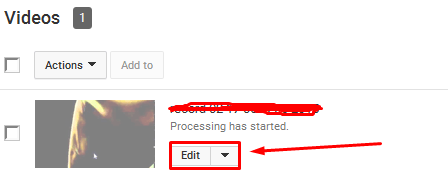
- You will see three tabs: “Basic info, Monetization, and Advanced Settings“. Select “Monetization” tab. Click on “Monetize with ads ” and Save changes!
- Now, open your video in new browser window. Ads will start showing on your video. That’s all. In this way, you can put Ads in your YouTube videos.
YouTube SEO
Simple YouTube SEO Formula – Rank your Youtube video in seconds
Just like bloggers rank and try to show their blogs on First page of Search Engines’s searches, YouTubers also rank and try to show their videos on the first page of YouTube searches.
Here are some tips that can help you to rank your YouTube videos on the first page of YouTube.
Tip 1: Use keywords in your video Title. Your video title must start with a keyword. The videos having keywords in mid or end of the title are ranked a bit later than those having keywords at the start!
Tip 2: Put your keywords in Description of video too. Never leave Description empty!
Tip 3: Share your videos on Social Media. Yes! Social signals also matter in YouTube SEO plus ranking. Promote your YouTube channel on Social Media’s like Facebook, Twitter.
What’s Next?
Just be patient, keep working. Monetize each of your videos and after some days or months, you will be able to earn awesome via YouTube and meet your needs :). Never lose hope!
Final Words
I hope you enjoyed that guide on How to Earn Money with YouTube. If you need any kind of help regarding this, feel free to ask in comments. Waiting for your feedback guys!